The Problem with Invasive Surveillance
During the rapid transition to remote work, many software tools introduced aggressive surveillance tactics: secret background keyloggers, unauthorized webcam snapshots, and continuous mouse-movement scoring. These mechanisms foster resentment and incentivize “mouse jiggling” rather than genuine creative output.
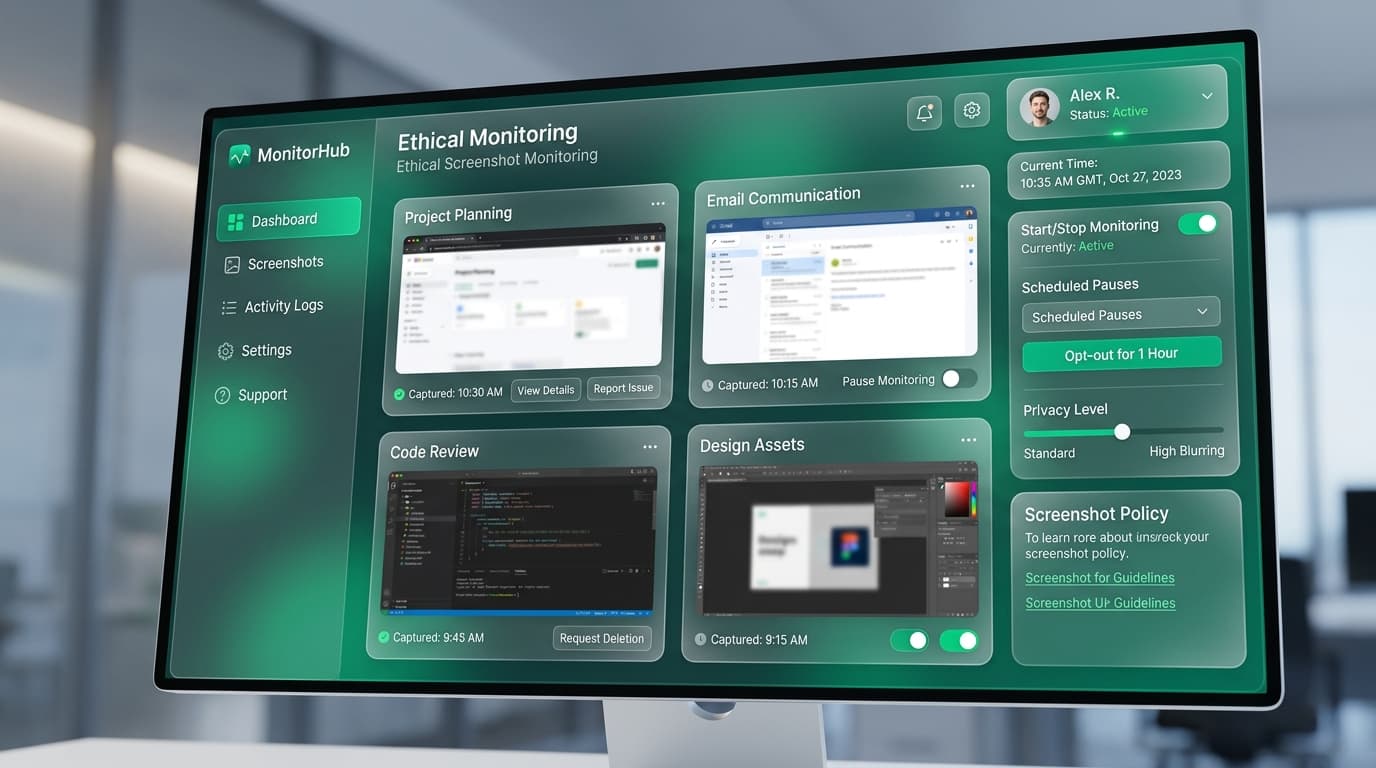
At TrackLabs, we believe screenshot technology should serve as an objective receipt of work completed, designed with mutual consent and full transparency.
of remote employees accept screenshot verification when privacy safeguards and blurring are enabled.
faster dispute resolution when client invoices are backed by timestamped proof-of-work.
secret keyloggers or covert monitoring tools included in TrackLabs architecture.
What Ethical Screenshot Monitoring Looks Like
Ethical monitoring transforms screen capture from a manager surveillance tool into a shared productivity record:
❌ Toxic Surveillance Approach
- Secret installation without employee knowledge
- Continuous, rapid-fire capture (every 30 seconds)
- No blurring of private messages or bank logins
- Zero employee ability to view or delete captures
- Used punitively for micro-managing bathroom breaks
✅ Ethical Proof-of-Work Approach
- 100% transparent with visible desktop timer controls
- Reasonable intervals (1-3 captures every 10 minutes)
- Automated blurring of sensitive text and PHI
- Employees can review and delete accidental captures
- Used for client billing verification and project audits
5 Essential Privacy Safeguards
To maintain an ethical culture, your monitoring stack must support five core privacy safeguards:
1. Screenshot Blurring by Default
Renders screen captures intentionally soft-focused. Text, passwords, and private tabs become unreadable while the broad application context remains visible.
2. Employee Review & Deletion Rights
Workers have complete access to their daily screenshot log. If an unexpected personal notification appears on screen, they can delete the tile prior to submission.
3. Selective App & URL Blacklisting
Automatically suspend screenshot capture when specific personal apps (e.g., WhatsApp, personal banking, email) are in focus.
4. Automated Data Purging
Screenshots are automatically deleted from servers after 30 to 90 days, eliminating unnecessary compliance and data breach exposure.
5. Visible Status Indicators
The desktop agent clearly indicates when a timer is running and when a screenshot is taken—eliminating any ambiguity.
Legitimate Business Use Cases (Billing & Security)
When applied responsibly, screenshot monitoring solves genuine business challenges:
- Client Invoicing & Scope Verification: Agencies provide clients with itemized visual proof of complex design or development work, accelerating payment approvals.
- Offshore Contractor Auditing: Companies verify deliverables across asynchronous time zones without requiring midnight status calls.
- SOC2 & Security Compliance: Financial and enterprise clients verify that only authorized personnel access sensitive production databases.
How to Frame Monitoring in Employee Handbooks
Include clear language in your company policy to align expectations:
“Our organization utilizes TrackLabs to track project deliverables and provide proof-of-work for client billing. Screenshots are captured at randomized intervals solely while a work timer is active. Employees have the right to review their timeline, enable blurring, and delete personal captures. Data is purged automatically every 60 days.”
Why Trust Always Outperforms Fear
Focus on Output, Not Minutes at Desk
Evaluate team performance based on sprint goals completed and client satisfaction rather than counting active seconds.
Involve Team Members in Policy Setup
Consult with team leads when deciding screenshot frequencies and privacy settings to ensure collective buy-in.
Reward High-Leverage Deep Work
Celebrate team members who achieve clean, focused blocks of deep work and deliver high-impact deliverables on schedule.
Implement Ethical, High-Trust Time Tracking
Experience proof-of-work screenshot monitoring designed with built-in privacy blurring and employee respect. Start your free 2-day trial today.

Specializes in distributed workforce telemetry, privacy-first employee monitoring, and labor compliance systems at TrackLabs.
Frequently Asked Questions
Ready to boost your team productivity?
Start your free 2-day trial with TrackLabs. No credit card required.
No credit card required · Setup in minutes · Cancel anytime